
Download Audiotool – Free Online Music‑Mixing Studio, Collaborative DJ App
Overview
Audiotool is a cloud‑based music‑mixing platform that lives entirely in your web browser. Designed for aspiring musicians, professional DJs, and producers who want a full‑featured studio without the hassle of installing heavy software, Audiotool delivers a realistic, modular mixing environment that mimics real hardware. The service is free to start, and it lets you create, edit, and publish tracks directly from any computer with a stable internet connection.
By leveraging a massive library of royalty‑free samples and community‑contributed presets, Audiotool makes it possible to craft polished productions without owning any physical gear. Its collaborative tools enable real‑time co‑creation, letting you invite other users to work on the same project or remix existing tracks with just a few clicks. Whether you’re a bedroom producer learning the ropes or a seasoned DJ looking for a portable, web‑native solution, Audiotool’s blend of digital instruments, effects, and routing capabilities offers a surprisingly deep workflow that rivals traditional DAWs.
Key Features and How to Get Started
Feature Highlights
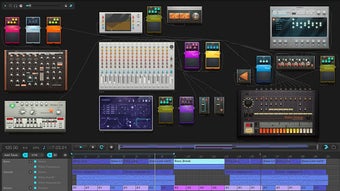
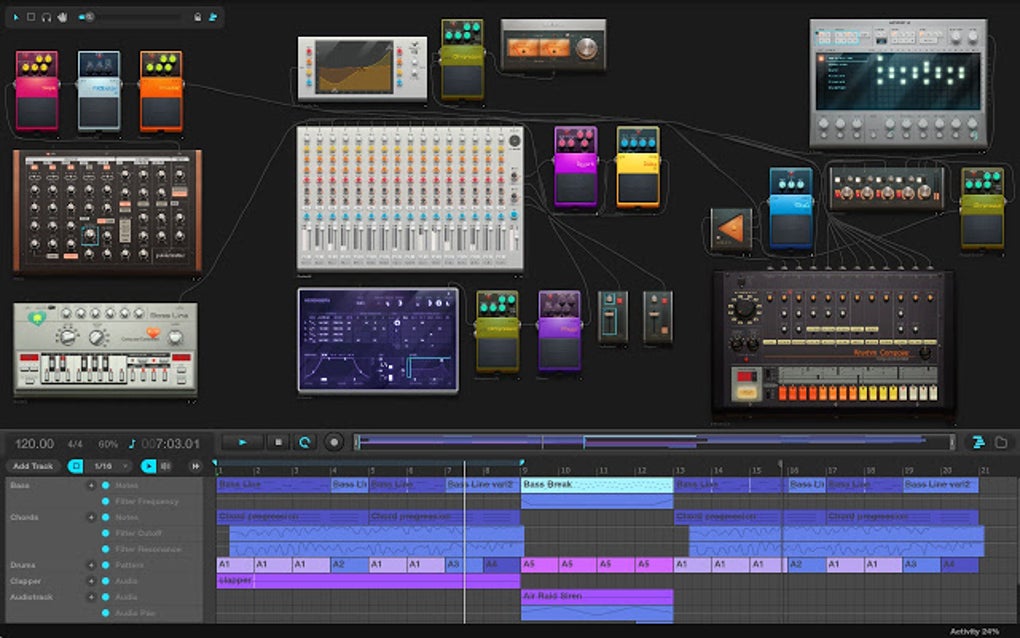
- Modular rack‑style interface – Drag‑and‑drop synths, samplers, drum machines, and effects onto a virtual rack just like you would with physical hardware.
- Extensive sample library – Over 250,000 royalty‑free audio samples from Loopmasters, New Loops, and community uploads.
- Preset database – More than 50,000 device presets allow you to jump‑start sound design.
- Web MIDI support – Connect external MIDI keyboards or controllers via the Web MIDI API for tactile performance.
- Real‑time collaboration – Invite friends or collaborators to edit the same project simultaneously, with changes syncing instantly.
- Cloud storage – All projects are saved on Audiotool’s servers, giving you access from any device without downloading files.
- Community hub – Publish tracks, receive feedback, remix other users’ work, and join discussion boards.
- Cross‑browser compatibility – Runs on Chrome, Firefox, Edge, and Safari without additional plugins.
Installation & First‑Time Use
Because Audiotool is a browser‑based add‑on, there is no traditional installation process. Follow these steps to start mixing within minutes:
- Create an account – Visit Audiotool.com and click “Sign Up.” You can register with an email address or use a social login (Google, Facebook).
- Verify your email – A confirmation link is sent to your inbox; click it to activate your account.
- Launch the studio – After logging in, click “Open Studio.” The web app loads the modular interface directly in the browser.
- Choose a template – New users can start from a blank rack or select a pre‑made template (e.g., “Hip‑Hop Beat,” “Techno Synth”).
- Add devices – Use the left‑hand panel to drag instruments, samplers, and effect units onto the rack. Connect them by drawing virtual cables between output and input nodes.
- Load samples or presets – Click the “Samples” or “Presets” tab, search the library, and drag the desired file onto a device.
- Start recording – Hit the red record button on the transport bar. Play your MIDI controller or program notes directly in the UI.
- Save and share – Click “Save” to store the project in the cloud. Use “Publish” to make the track public, add tags, and invite collaborators.
All actions are performed online, so your progress is automatically backed up. If you lose internet connectivity, the session is paused and resumes once the connection is restored.
System Compatibility and Pros / Cons
Supported Operating Systems
Audiotool works on any modern operating system that can run a recent web browser, including Windows 10/11, macOS Ventura and later, Linux distributions, Chrome OS, as well as mobile browsers on Android 12+ and iOS 15+. The only requirement is a stable broadband connection and a browser that supports the Web Audio API and Web MIDI API for hardware integration.
Pros
- Completely free entry tier with no download required.
- Rich library of samples and presets eliminates the need for third‑party sound packs.
- True cloud‑based workflow enables seamless switching between desktop and laptop.
- Collaboration tools foster community creativity and remote co‑production.
- Modular rack mimics hardware, giving a tactile feel for DJs used to physical gear.
- Web MIDI support brings external keyboards into the browser environment.
- Regular updates are pushed automatically—no manual patching.
Cons
- Performance depends heavily on internet speed; latency can be noticeable on slower connections.
- Heavy projects may cause the browser to consume significant RAM.
- Offline work is limited; you must be online to load samples or save changes.
- Advanced features (e.g., higher track count, premium samples) require a paid subscription.
- Audio rendering is done server‑side, which can add a few seconds to export times.
Frequently Asked Questions
Is Audiotool truly free or are there hidden costs?
Audiotool offers a fully functional free tier that includes unlimited project saves, access to the core sample library, and community publishing. Premium features—such as high‑resolution export, exclusive sample packs, and increased storage—are available via a subscription called “Audiotool Premium,” but they are optional and clearly advertised.
Can I use my own MIDI controller with Audiotool?
Yes. Audiotool supports the Web MIDI API, allowing you to connect any standard MIDI keyboard or controller. After enabling MIDI in your browser settings, the device appears in the “MIDI” dropdown, and you can map keys to virtual instruments just like on a traditional DAW.
How does project export work?
When you click “Export,” Audiotool renders the mix on its servers and provides a downloadable WAV or MP3 file. The process typically takes 30 seconds to a few minutes, depending on track length and effect complexity. Premium users can export in 24‑bit/96 kHz for higher fidelity.
Is my data safe on Audiotool’s cloud?
Audiotool stores projects on encrypted servers with regular backups. The platform complies with GDPR standards for European users, and all personal data is handled according to its privacy policy. Nevertheless, it’s good practice to export a local copy of critical projects periodically.
Can I collaborate with musicians who use other DAWs?
Collaboration is limited to the Audiotool environment. However, you can export stems (individual track files) and share them with users of other DAWs. Those users can import the stems into Ableton, FL Studio, Logic, etc., and continue working offline.
Conclusion – Why You Should Download Audiotool Today
Audiotool stands out as a uniquely accessible, cloud‑native solution for music creation. Its modular rack, extensive sample library, and real‑time collaboration tools give both beginners and seasoned producers a professional‑grade studio without the overhead of traditional software installations. While a stable internet connection is essential and some advanced capabilities are gated behind a premium plan, the free tier already provides everything needed to compose, mix, and publish tracks directly from a browser. If you’re looking for a secure, constantly updated platform that works on Windows, macOS, Linux, Android, and iOS, Audiotool is a compelling choice. Dive in, explore the community, and start turning your musical ideas into polished productions—all with a single click.
Ready to start mixing? Download Audiotool now and join a global network of creators who are shaping the future of online music production.
Pros: Free entry tier, browser‑based, huge sample library, collaborative features, MIDI support.
Cons: Requires internet, higher‑end export needs premium, occasional browser memory load.







